Back to Personal Account
How do I add funds to my balance?
There are several ways to add funds to your EventCartel balance and receive credits on your account.
Using a Gift Card:
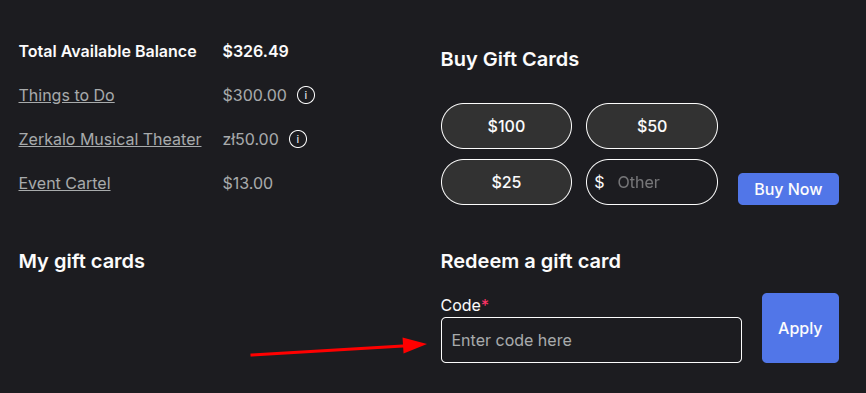
You can receive a gift card from another user or purchase one yourself. To add funds, redeem the card in your account. Once redeemed, the amount shown on the card will be added to your balance.
- Log in to your EventCartel account;
- Hover over the account icon (in the top right corner of the page);
- Click "Gift Cards";
- Select "Redeem Gift Card";
- Enter the gift card code;
- Click "Apply".
Get a sign-up bonus in the Mobile App:
After registering in the EventCartel mobile app, you will automatically receive a $5 credit to your balance.
The app is available for:
Invite Friends and earn rewards:
- Open the EventCartel app;
- Tap "Invite Friends";
- Send invitations to your friends;
- After signing up, your friend will receive a $5 bonus;
- When the invited user makes their first purchase, you will also receive $5.

Receive refunds as account credit:
In the event of a cancellation or postponement, as well as ticket exchanges or insurance refunds, you may choose to have the funds credited to your account balance. This is a fast and convenient way to receive your money and use it for future purchases.
Earn rewards through the referral program:
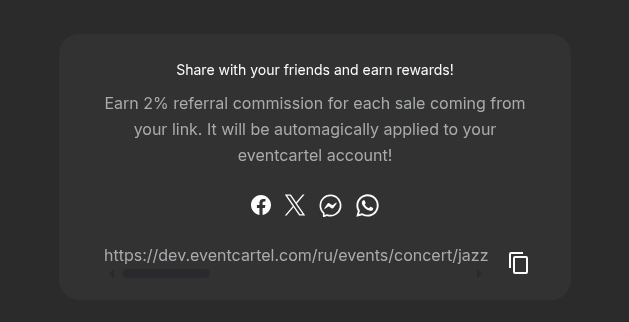
After purchasing tickets, you will receive a personal referral link for that event. You can share it with friends or post it on social media.
If another user purchases tickets through your link, you will receive 2% of the order value. The reward will be automatically credited to your account balance.
The referral link is valid only for the event for which the tickets were purchased.
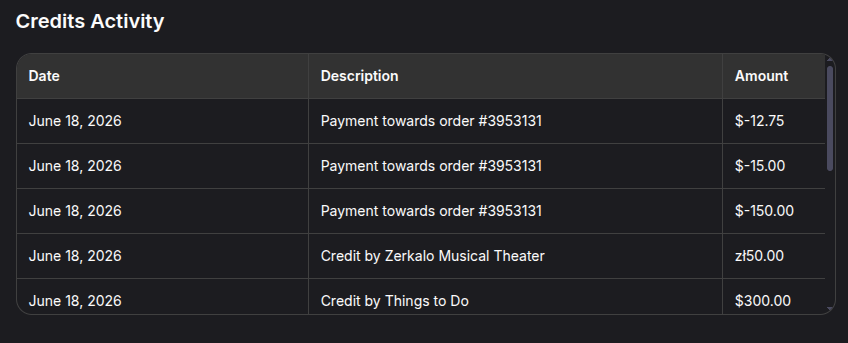
You can track all balance activity and see where your credits came from in "Gift Cards" → "Credits Activity".
In addition, you may receive email notifications to keep you informed about balance changes and new credits.